TL;DR
- Agent Teams runs multiple Claude Code instances as a coordinating team. The architecture is different from traditional subagents (the Task tool).
- To reuse existing skills or agent definitions inside Agent Teams, you have to spell out file paths in the prompt and tell teammates to read them — there’s no structural way to wire them in yet.
- Token consumption is several times higher than the skill approach. Use skills for work where skills are enough; reach for Agent Teams only when parallel execution clearly pays off.
What is Agent Teams?
Released as an experimental preview on February 5, 2026 — alongside Claude Opus 4.6. Multiple Claude Code instances run in parallel as a “team.”
Claude Code’s extension surface has several layers:
Skills (Skill tool)
  └── Expanded and executed inside the main session
       └── May invoke the Task tool internally

Subagents (Task tool)
  └── Spawned as independent instances
  └── subagent_type lets you point at a custom agent definition

Agent Teams (TeamCreate + SendMessage + TaskList, etc.)
  └── Spawning a teammate = Task tool + inter-team messaging + shared task list
Traditional subagents are independent instances spawned via the Task tool — a hub-and-spoke shape from parent to children. Children can’t talk to each other; they only return results to the parent. The Task tool ships with four built-in types (Bash / general-purpose / Explore / Plan), and subagent_type lets you point at a custom agent definition (.claude/agents/*.md); the knowledge baked into that definition is loaded automatically.
Agent Teams is an orchestration layer on top of the Task tool that adds inter-team messaging and a shared task list. The big difference: teammates can send messages directly to each other.
[Subagent model]
  Parent agent
    ├── Task → Child A (returns result to parent)
    ├── Task → Child B (returns result to parent)
    └── Task → Child C (returns result to parent)
  * Children can't talk to each other. subagent_type lets you specify a definition.

[Agent Teams model]
  Team Lead
    ├── Teammate A ←→ Teammate B
    ├── Teammate B ←→ Teammate C
    └── Teammate A ←→ Teammate C
  * Teammates can message each other directly.
Note that teammates are themselves independent Claude Code instances, so in principle they should be able to invoke subagents via the Task tool (the documented restriction is only “no nested teams” — using the Task tool by itself isn’t restricted). In practice, though, this didn’t work for me. If it did, existing custom agent definitions could be reused as-is, so I’d love to see this fixed.
Here’s a screenshot of seven reviewers running in parallel across tmux split panes:
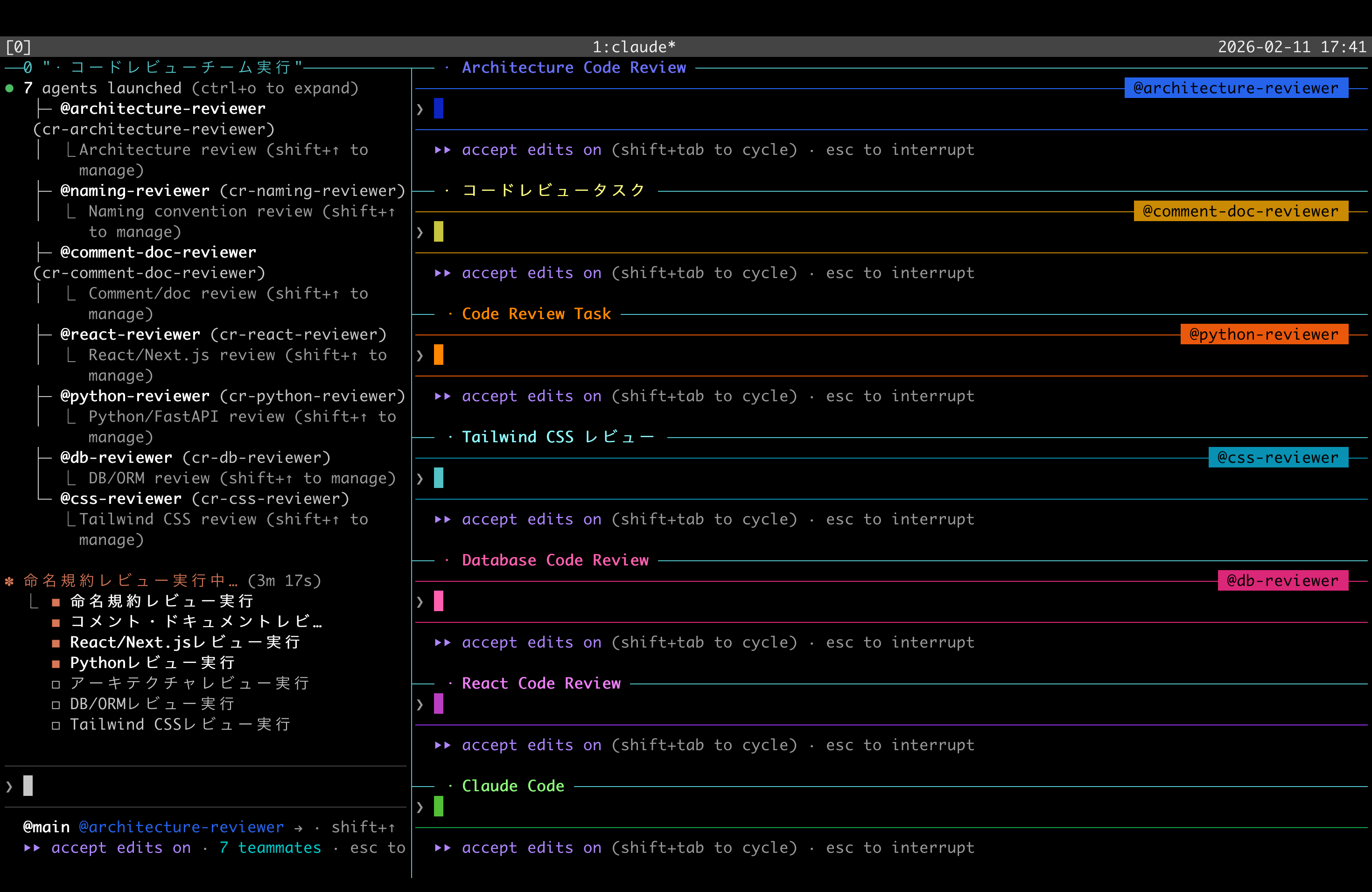
The team has a shared task list with state and dependency management. When a blocker is cleared, an idle teammate autonomously claims the next task. There’s no file-level locking, though, so concurrent writes to the same file need attention.
Enabling and using it
Enable it in settings.json:
// ~/.claude/settings.json
{
  "env": {
    "CLAUDE_CODE_EXPERIMENTAL_AGENT_TEAMS": "1"
  },
  "teammateMode": "auto"
}
"auto" for teammateMode picks split panes when running inside tmux, and in-process mode (toggle with Shift+Up/Down) elsewhere. You drive it in plain natural language:
Set up a team to review PR #42 in this project.
Spawn three reviewers:
- Security
- Performance
- Test coverage
Have each one review and report results.
As a baseline, Max 5x ($100/month) or higher is recommended. The Pro plan ($20/month) hits limits quickly.
Reusing Existing Knowledge: The Current State of Natural-Language Prompts
There’s something to be aware of when using Agent Teams.
Claude Code already has extension mechanisms like skills (SKILL.md) and custom agents (.claude/agents/*.md). In a single session they’re loaded automatically, and Task-tool subagents can invoke them simply by naming them in subagent_type.
But Agent Teams currently provides no structural way to tell a teammate “use this skill” or “run with this agent definition.” If you want a teammate to use an existing definition file, you have to embed the file path in the prompt and tell them, in natural language, to read it.
You have to spell out paths in detail
Say you’ve curated code-review agent definitions under ~/.claude/agents/. To use these from Agent Teams, you have to write out the directory structure and file paths in the prompt and tell each teammate “which file to read and how to use it.”
### Directory structure

~/.claude/
├── agents/                       # Review perspective definitions
│   ├── review-architecture.md
│   ├── review-naming.md
│   └── review-frontend.md
└── knowledge/                    # Reference knowledge
    ├── architecture/
    │   ├── patterns.md
    │   └── anti-patterns.md
    └── naming/
        └── conventions.md

### Teammate read procedure

1. Read `~/.claude/agents/review-{your-area}.md` to learn
   the review perspective and output format.
2. If the definition references other files, load the matching
   knowledge file.
3. Use that knowledge to ground your review.
In skills or with the Task tool, the framework handles agent definition paths and read order. With Agent Teams, you currently have to write all of that yourself, inside the prompt.
Comparison with the skill approach
| Aspect | Skills / Task tool | Agent Teams |
|---|---|---|
| Specifying an agent definition | Name it via subagent_type | Write the file path in the prompt |
| Loading knowledge | Automatic via references inside the definition | Spell out the procedure in the prompt |
| Output destination management | Defined inside the skill | Specified per-teammate in the prompt |
| Execution control | Follows the skill’s flow | Design Phase structure in the prompt |
In other words, even when you’ve accumulated knowledge as skills or agent definitions, using it from Agent Teams requires translating that content into a natural-language prompt. This should resolve once Agent Teams can reference skills or agent definitions directly, but as of February 2026 we’re not there yet.
Prompt Design Guidelines
Combining the official Agent Teams docs with community findings, here are the points worth keeping in mind.
Sharing context with teammates
Teammates don’t inherit the lead’s conversation history — they spawn as independent instances. CLAUDE.md and MCP servers are loaded automatically, but anything else has to be passed in the spawn-time prompt or via files.
Separating output files
There’s no file-level locking, so design things so each teammate owns a different file set.
Phase structure for staged control
Splitting the prompt into Phases — “prep → parallel work → integration → completion” — makes the Team Lead’s behavior easier to control.
Delegate Mode (Shift+Tab) is also useful. It restricts the lead’s tool execution permissions so they focus on coordination, but as of February 2026 there’s a reported bug where teammates lose tool access (GitHub Issue #24073).
Sample: Agent Teams Code Review Prompt
Below is a sample Agent Teams code review prompt that reflects the points above. It’s structured so existing agent definition files get loaded by each teammate.
Assumption: This assumes you have agent definition files in
~/.claude/agents/. The team will spawn even without them, but the review perspectives and output format depend on what’s in those definitions.
Boilerplate agent definition files (simple samples)
review-architecture.md (Architecture reviewer)
# Architecture Reviewer

## Role
Conduct architecture- and design-level code review.

## Review perspectives
- Soundness of directory structure and layer separation
- Direction of dependencies
- Adherence to single responsibility principle
- Excessive abstraction or unnecessary complexity

## Scoring
Tag each finding with severity:
- [Critical]: Serious issue
- [Warning]: Concern worth improving
- [Suggestion]: Suggestion for a better design

## Output format
- **[severity]** filename:line — issue
  - Why: why it's a problem
  - Fix: how to address it
review-naming.md (Naming reviewer)
# Naming Reviewer

## Role
Review naming conventions for variables, functions, classes, and files.

## Review perspectives
- Adherence to language-specific naming conventions (camelCase / snake_case / PascalCase)
- Whether the role can be inferred from the name (semantic clarity)
- Consistency of abbreviations (e.g. mixing btn vs button)
- Boolean prefixes (is / has / should)
review-frontend.md (Frontend reviewer)
# Frontend Reviewer

## Role
Review frontend-specific patterns in React/Vue/etc.

## Review perspectives
- Component decomposition granularity and Props design
- Appropriateness of state management patterns
- Performance (unnecessary re-renders, over/under-memoization)
- Accessibility (semantic HTML, ARIA attributes)
Full prompt
Run a code review on this repository using an agent team.
Follow the procedure and proceed autonomously. Only ask the user
when you're unsure.

## Reference file guide

The definition files and knowledge for the review live under `~/.claude/`.
Each teammate should load the files matching their assignment.

### Directory structure

~/.claude/
├── agents/                       # Review perspective definitions (perspective + output format)
│   ├── review-architecture.md    # Architecture review
│   ├── review-naming.md          # Naming convention review
│   └── review-frontend.md        # Frontend-specific (conditional)
│
└── knowledge/                    # Reference knowledge
    ├── architecture/
    │   ├── patterns.md
    │   └── anti-patterns.md
    ├── naming/
    │   └── conventions.md
    └── frontend/
        └── best-practices.md

### Teammate read procedure

1. Read `~/.claude/agents/review-{your-area}.md` to learn
   the review perspective and output format.
2. If the definition references other files, load the matching
   file from `~/.claude/knowledge/`.
3. Use that knowledge to ground your review.

---

## Procedure

### Phase 0: Confirm review scope

Confirm with the user:

1. **Review target**: specific files / recent commits / whole project
2. **Review depth**: full (default) / quick (Critical only)

### Phase 1: Preparation (Team Lead)

1. Create a scratch directory:
   `.claude/code-review-team/.scratch/{YYYY-MM-DD-HHmm}/`

2. Only when "recent commits" is selected, generate a diff context:
   - Save the result of `git diff HEAD~N` to `{scratch}/diff-context.md`

3. Run tech stack detection:
   Identify frameworks from `package.json`, `requirements.txt`, etc.
   Write the result to `{scratch}/stack-detection.md`

4. Read the detection result and decide the team composition for Phase 2

### Phase 2: Team creation & parallel review

Create a team named "code-review" and spawn the following
teammates in parallel.

#### Required members (always spawned)

1. **architecture-reviewer**
   - Role: Architecture / design-level review
   - Definition: `~/.claude/agents/review-architecture.md`
   - Output: `{scratch}/architecture-review.md`

2. **naming-reviewer**
   - Role: Naming convention review
   - Definition: `~/.claude/agents/review-naming.md`
   - Output: `{scratch}/naming-review.md`

#### Conditional members (added based on stack detection)

- **frontend-reviewer** — when React/Vue etc. is detected
  Definition: `~/.claude/agents/review-frontend.md`
  Output: `{scratch}/frontend-review.md`

#### Common rules for all teammates

- First, read `{scratch}/stack-detection.md`.
- Read your own agent definition and follow its perspective and output format.
- If the definition references other files, load them from `~/.claude/knowledge/`.
- Write review results incrementally to your output file.
- Tag each finding with severity: [Critical] / [Warning] / [Suggestion].
- When done, message the Team Lead:
  "Review complete. Critical: X, Warning: Y. See {output} for details."

### Phase 3: Report integration

Once all teammates are done:

1. Read every review file under `{scratch}/`,
   deduplicate, normalize priorities, and produce an integrated report.
   **Note**: Only files inside *this* scratch directory should be integrated.
2. Output: `docs/code-review-team/{YYYY-MM-DD-HHmm}-review.md`

### Phase 4: Wrap up

1. Delete the "code-review" team
2. Present the report to the user and confirm the fix strategy:
   - Fix all findings in one pass
   - Fix only Critical/Warning
   - User will fix themselves (report only)
The point of this sample is that the directory structure is laid out at the top of the prompt and each teammate is told exactly which paths to read. With skills you wouldn’t need any of this; with Agent Teams, today, you do.
On Token Consumption
Agent Teams burns a lot of tokens. Each teammate runs as an independent Claude Code instance, so cost scales with team size.
On the Max 20x ($200/month) plan, running a team with five or more teammates 2–3 times per hour consumed about 4% of my Max usage. Because each teammate is its own instance, costs grow with headcount.
Honestly, I haven’t run it enough times to measure how much the final output quality differs between the skill approach (Task tool) and Agent Teams. The speed benefit from parallel execution is tangible, but whether the quality improvement justifies the cost takes ongoing testing to find out.
You can rein in cost by assigning Sonnet to the teammates, but the Pro plan ($20/month) is realistically too tight; Max ($100–200/month) feels like the floor.
Leveraging the weekly reset
Claude Code usage limits reset on a 7-day rolling window. The
/usagecommand shows the next reset, so timing Agent Teams sessions to weeks where you have headroom makes them easier to plan.
Limitations (as of February 2026)
Agent Teams is in experimental preview. The main limits:
| Limitation | Impact |
|---|---|
| No session resume | /resume doesn’t restore teammates |
| No file locking | Concurrent edits to the same file can overwrite each other |
| One team per session | Multiple teams can’t run simultaneously |
| No nested teams | Teammates can’t spawn sub-teams |
| Split panes constraints | VS Code integrated terminal, Windows Terminal, and Ghostty are unsupported |
| Slow shutdown | Shutdown waits for teammates to finish their current request or tool call, which takes time |
| No direct reference to existing knowledge | No structural way to point Agent Teams at skills or agent definitions |
Wrap-up
Agent Teams enables autonomous coordination via direct teammate-to-teammate messaging and a shared task list.
That said, you currently have to express the entire team configuration in natural language, and reusing existing skills or agent definitions means painstakingly enumerating file paths. What the framework used to do for you in the skill approach, you now write yourself inside the prompt.
Token consumption is also high, and I haven’t yet been able to clearly measure the quality delta against the skill approach. Looking forward to deeper integration with skills and agent definitions, but for now I’d say “use skills when skills are enough; reach for Agent Teams when parallel execution clearly adds value” is the practical split.
References
- Orchestrate teams of Claude Code sessions — Claude Code official docs
- Introducing Claude Opus 4.6 — Anthropic