TL;DR
- Discovery: Claude Code can’t generate images itself, but it can delegate to Images 2.0 via OpenAI’s official Codex plugin — so image generation from Claude Code becomes possible after all.
- 4 pitfalls: Naively handing off the task gets you a background process that dies silently / a sandbox write restriction / CJK garbling / a session hang via
Skill(). - Fix and design: Call it with
Agent(subagent_type="codex:codex-rescue", ...)instead ofSkill(), and let the parent agent handle the cross-sandboxcp, thels -laverification, and the visualReadcheck (role separation + “don’t take the completion report at face value” real verification).
Update, June 20, 2026: After publishing this article, I found a frequent failure — in some sessions the Bash approval for
Agent(codex:codex-rescue)gets denied, so image generation is never reached. I’ve added the cause and the workaround (a fallback where the parent runs the same generation directly) in the “Addendum” at the end.
Introduction
Claude Code is my daily driver, so honestly I had no idea you could “call Images 2.0 via Codex this easily.”
Claude Code can generate images and video too — just wire up an MCP like HiggsField. But that burns credits, so it’s not well suited to the casual workflow of cranking out a bunch of rough drafts.
Images 2.0 (OpenAI’s latest image generation model, GPT Image 2), on the other hand, is high quality and useful in lots of places: web design mockups, article banners, diagrams. Being able to call it casually would be genuinely handy.
And it turns out the entry point was already officially available.
Conclusion: You Can Call Images 2.0 from Claude Code
Given up on generating images in Claude Code? It turns out that just installing the Codex plugin that OpenAI ships officially, openai/codex-plugin-cc, gives you access to imagegen (OpenAI’s latest image generation model, Images 2.0 / GPT Image 2) from inside Claude Code. You can generate images from Claude Code indirectly.
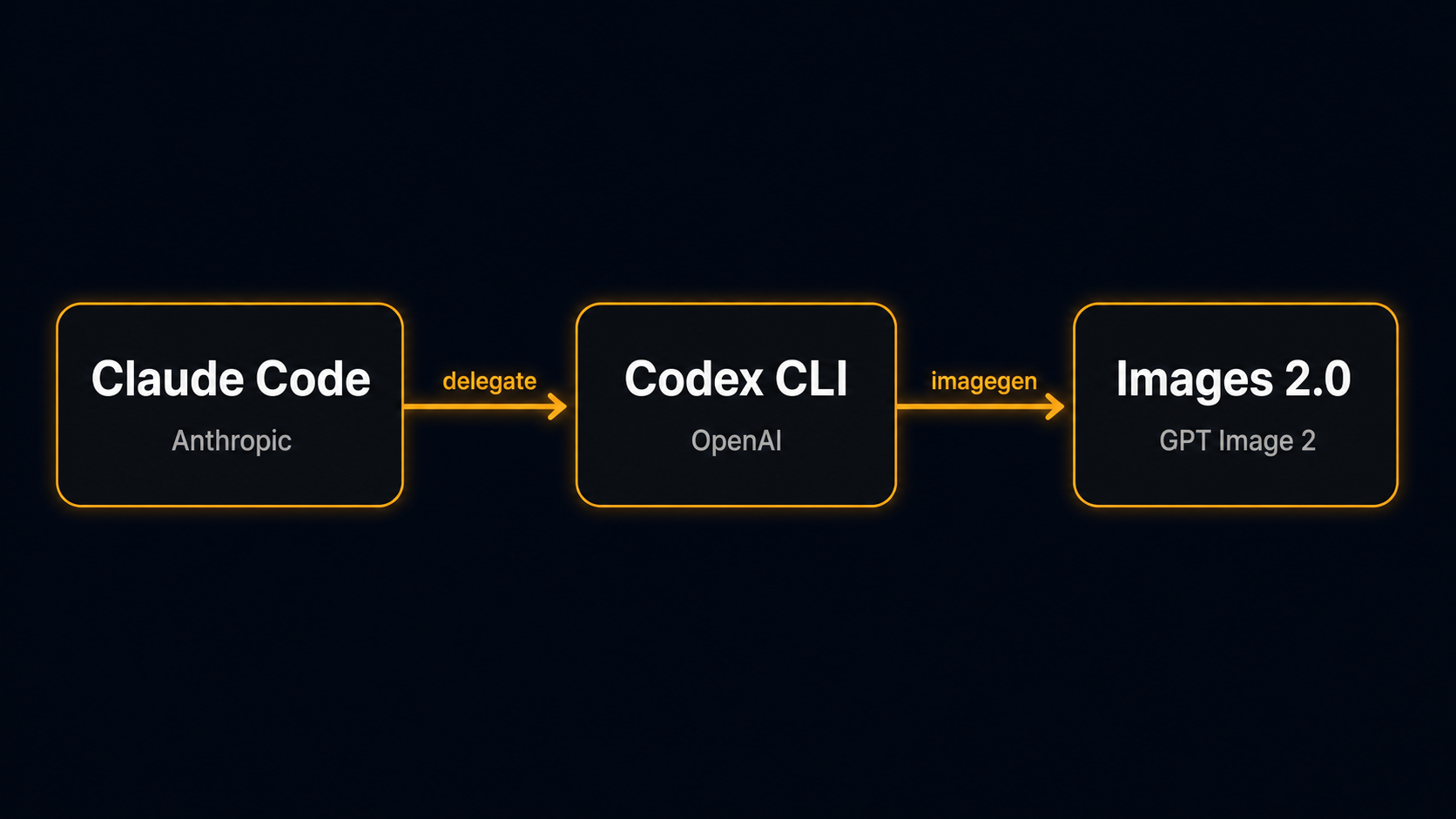
Claude Code (parent agent, Anthropic)
   └─ Delegates to the codex:codex-rescue subagent (via Agent)
       └─ Codex CLI (child agent, OpenAI)
           └─ imagegen skill → Images 2.0
The very setup — OpenAI shipping an official plugin on top of competitor Anthropic’s Claude Code — is interesting in itself. Released 2026-03-30, with over 21,000 stars at the time of writing (June 16, 2026). If you use AI tooling across providers, knowing about this widens your options.
Why This Is Nice
Claude Code has a layered extension mechanism — plugin / skill / agent / subagent — and routing through the Codex plugin lets you pass work from an Anthropic-side agent (Claude) to an OpenAI-side agent (Codex).
- You can play to the strengths of Anthropic’s models (Claude Opus/Sonnet) while also calling the capabilities of OpenAI’s models (the GPT-5 family, imagegen, etc.) within the same session.
- Since you run Codex on your own OpenAI billing, you reduce lock-in to a single vendor.
- Beyond image generation, you can also delegate Codex features like
review/adversarial-review/rescuefrom the Claude Code side.
In other words, “I got image generation working” is the tip of the iceberg. The real point is that an entry point for cross-provider delegation is already officially provided.
From Here On, It’s About Using It Smoothly
Between “you can call it” and “you can use it smoothly” there were 4 pitfalls. In chronological order, I’ll share how I knocked each one down and how I ultimately distilled them into my own skill, codex-image-gen.
Pitfall 1: It Dies Silently in the Background
At first I naively asked /codex:rescue to “turn this diagram into an image.”
The reply:
I'll use the imagegen skillAnd then — nothing happened.
- No notification
- No file
- Claude Code’s
TaskList/TaskOutputdidn’t recognize the Codex-internal task id; firingwait_agentreturnedinvalid agent id, and firing thread returnednot_found
Cause
Depending on the situation, the Codex rescue subagent launches with --background (fork) by default. The forked child process can’t be tracked by Claude Code’s harness, and no completion notification arrives. It’s the classic “one side is running off in the background on its own” failure mode you see in LLM integrations.
Fix
Make the delegation prompt explicitly state “don’t go to the background; run in the foreground all the way to completion.” That alone changes the behavior.
Pitfall 2: Sandbox Path Restrictions
On my second attempt — this time stating “run to completion in the foreground” — the image generation itself succeeded. But saving to the specified ~/Downloads/example-image.png gave:
Operation not permittedCause
The Codex CLI runs by default in a workspace-write sandbox, and what it can write is limited to its own workspace (the working directory where the session started). Something like ~/Downloads, directly under the home directory, is outside the workspace, so naturally it gets rejected. (You can widen the write targets by adding writable_roots in the config, but in this article I take the approach of having the parent do the cp.)
Fix
Put “if you can’t write, save inside the workspace and report the absolute path” into the delegation prompt. With that, Codex saves inside the workspace (e.g., /path/to/workspace/generated/codex-image-xxx.png) and returns the absolute path in its completion report.
After that, the parent agent (Claude Code side) rescues the file to the destination path with cp. Crossing the sandbox boundary is the parent’s job — that’s the division of labor.
cp /path/to/workspace/generated/codex-image-xxx.png ~/Downloads/example-image.pngIn my measurements each image was around 1–2 MB (2,378,465 bytes in the case described later).
Pitfall 3: CJK Garbling
When I put Japanese into a technical diagram’s labels, “複雑” (complex) came out garbled as “霊等”. Images 2.0 is weak at long CJK labels, and it falls apart especially when characters are densely packed, as in technical diagrams.
Fix (with a trade-off)
I settled on this approach: for text-heavy technical diagrams, also produce a Mermaid version as the canonical source of truth, and use the Codex image as an auxiliary “good-looking version.”
| Use case | Recommendation |
|---|---|
| Text-heavy technical diagrams (architecture, sequence diagrams) | Mermaid as the source of truth; Codex image for decoration |
| Single illustrations with little text (illustrations, thumbnails) | Codex alone is fine |
| You really want CJK in the image | Limit to English alongside, or short labels |
It’s a straightforward trade-off: Mermaid is accurate but looks formulaic, while the Codex image looks great but has lower text fidelity.
Pitfall 4 (the biggest): Skill(codex:rescue) Hangs
Working around the three pitfalls with hand-written prompts every time got tedious, so I decided to bundle them into a custom skill called codex-image-gen. And right here I stepped on the biggest pitfall.
What I Did
In the first version of the skill, I wrote the delegation phase like this:
Skill(skill="codex:rescue", args={prompt: "..."})Intuitively I thought I was just “calling the official slash command with the Skill tool.” When I ran it:
Launching skill: codex:rescue…stayed displayed, and it was, by any feel, “clearly taking way too long.” All I could do was abort from the user side, and no image ever got generated.
Cause: It Was Explicitly Forbidden in the Official Docs
Re-reading ~/.claude/plugins/cache/openai-codex/codex/{version}/commands/rescue.md, the iron rule for how to call it was spelled out clearly.
| How to call | Result |
|---|---|
Skill(codex:rescue) | NG — re-enters this command and the session hangs |
Skill(codex:codex-rescue) | NG — no such skill exists |
Agent(subagent_type="codex:codex-rescue", prompt=...) | OK — the correct way |
The reason is structural. codex:rescue is a slash command, and internally it launches the real subagent codex:codex-rescue via the Agent tool. If you call Skill(codex:rescue) from a Claude skill into that, the slash command gets invoked recursively, the internal state can’t be resolved, and it hangs.
Why I Missed It
The culprit was that the name /codex:rescue and the Skill tool’s “you can call slash commands” capability superficially appear to line up. codex:rescue (slash command) and codex:codex-rescue (subagent) are in separate namespaces: the former is the window you knock on, and the latter is what a custom skill should call. The cause of my defeat was designing it from the general theory of the Skill tool without reading the official repo.
Fix
I rewrote the delegation phase from Skill() to Agent().
Before (NG):
Skill(skill="codex:rescue", args={prompt: "<delegation prompt>"})After (OK):
Agent(subagent_type="codex:codex-rescue", prompt="<delegation prompt>")The diff is small, but it’s a fundamental change from “via slash command” to “calling the subagent directly.” To prevent a recurrence, I put “no calling via Skill, must go via Agent” at the very top of the skill’s “guardrails.”
Verification After the Fix
With the fixed skill I tried generating a single vertical (9:16) illustration. Here’s the processing flow and the actual measurements:
Codex generates the image with imagegen (about 9 min / 539,756 ms)
        ↓
Saves inside the workspace (2,378,465 bytes)
  /path/to/workspace/generated/codex-image-xxx.png
        ↓
Parent agent rescues it to the destination Downloads directory with cp
        ↓
Parent opens it with Read for a visual check → drawing elements nearly perfect
The spec was “no text inside the image,” so the CJK garbling risk was zero. Conversely, if you do want to include CJK, the Pitfall 3 trade-off still applies.
Delegation Prompt Template (Copy-Paste Ready)
I’ll paste the template I actually use, as is. These are the prerequisite-check and delegation parts.
Prerequisite Check
# Check that the Codex plugin exists
ls ~/.claude/plugins/cache/openai-codex/codex/
# v1.0.4 or later recommended
# If it's not installed, see https://github.com/openai/codex-plugin-cc
Delegating to Codex (how to call it)
Agent(
  subagent_type="codex:codex-rescue",
  prompt=<the delegation prompt template below>
)
Do not use Skill(codex:rescue) here. It’s forbidden in the official commands/rescue.md (see Pitfall 4 for the reason).
The Delegation Prompt Template Itself
[Task]
{Describe the use case, drawing elements, style, and aspect ratio here}

[Save destination]
{Absolute path. Example: ~/Downloads/example-image.png}

[Steps]
1. Generate the image with Images 2.0 / imagegen.
2. Save it to the destination path above. If you can't write, save inside the workspace and report that absolute path.
3. Verify the file exists and its size with `ls -la {destination path}`.
4. Include the file's absolute path and byte count in the completion report.

[Important — strictly follow]
- Do not go to the background; run in the foreground all the way to completion.
- Report only after finishing the save and the ls -la check (don't stop midway).
- If you include Japanese text, render it accurately. If you're worried CJK characters will break, including English alongside is fine.
- Don't stop the moment you call the imagegen skill; carry it through to the end.
Parent-Side Rescue, Verification, and Visual Check (pseudocode)
# 1. Cross-sandbox rescue
if (Codex's completion report returns an in-workspace path):
    cp {in-workspace path} {user's desired path}

# 2. Real verification
ls -la {user's desired path}
# Confirm the size is non-zero and the file exists

# 3. Visual inspection
Read({user's desired path})
# If there's CJK garbling, offer to regenerate / use the English version / switch to Mermaid
Addendum: In Some Sessions, the Bash Approval for Agent Gets Denied
After publishing this article, this was the failure I hit most. Even when you delegate the correct way with Agent(subagent_type="codex:codex-rescue", ...), it can whiff without ever reaching image generation.
Symptom
The parent (main loop) Bash works, but only the Agent subagent’s Bash gets denied every time. That asymmetry is the decisive sign. It comes back after tens of seconds with nothing happening — no trace that Codex ran (no imagegen output, no save report).
Cause
In sessions where Agent() is launched in the background (async), the background subagent can’t surface an interactive approval prompt. So a Bash call that needs approval gets auto-denied for “no approver present.” This is session-dependent — the same steps can go through in another session.
Two things to note:
Agent’smode: "bypassPermissions"can’t beat a higher-level deny.- Writing “I approve” in chat does nothing — the harness’s permission rules don’t change, and it only reaches the background subagent as text.
Fix: Have the Parent Run the Same Generation Directly (fallback)
codex:codex-rescue is just firing a single raw companion command internally, so having the parent run that directly in the foreground is equivalent. The decisive difference: with the parent’s main-loop Bash, the approval prompt is visible to the user — so you can approve it on the spot.
# Resolve the absolute path of the installed companion (latest version)
CODEX_DIR=$(ls -d ~/.claude/plugins/cache/openai-codex/codex/*/ | sort -V | tail -1)
COMPANION="${CODEX_DIR}scripts/codex-companion.mjs"

# Pass the full image-generation prompt you would have handed to Agent
node "$COMPANION" task "<full delegation prompt>" --write--writegives the workspace-write sandbox (writable). Don’t add--background.- From there, reuse the usual
cprescue →ls -laverification →Readvisual check. - This is not the same as re-entering
Skill(codex:rescue)(which hangs). The parent just runs directly the same command the subagent would fire, so it doesn’t freeze. It’s strictly a fallback for when the Agent path is denied.
When Even the Parent’s node Gets Denied
Don’t fall into a question loop — recover with one of these:
- Easiest: approve the prompt that appears during the foreground run above (this session only, no config change).
- Only if you want to skip the prompt every time, add an allow rule via
/permissions— but note it’s persisted to a settings file.Bash(node:*)is too broad, so narrow it to the companion’s path, or put it in.claude/settings.local.json(gitignored) to limit the blast radius. - Permission state varies per session, so reopening in a fresh session can fix it on its own.
Summary
Even though Claude Code alone can’t create images, you can generate them by delegating to Images 2.0 via OpenAI’s official Codex plugin. But the key to making it production-ready was less about image generation itself and more about the etiquette of delegation.
- Check how to call it in the official docs. There are similarly named but distinct things, like
codex:rescue(slash command) andcodex:codex-rescue(subagent), and from a skill the correct path is viaAgent(). - Don’t trust the delegate’s “done.” Concentrate the cross-sandbox
cpand the final verification (ls -la,Read) in the parent. This role separation works not just for Codex but for delegation via MCP in general.
References
- OpenAI’s official Codex plugin: https://github.com/openai/codex-plugin-cc
- The iron-rule doc when installed locally:
~/.claude/plugins/cache/openai-codex/codex/{version}/commands/rescue.md - Images 2.0 / GPT Image 2 (OpenAI’s latest image generation model. Successor to 2025’s GPT-4o image generation, released 2026-04)